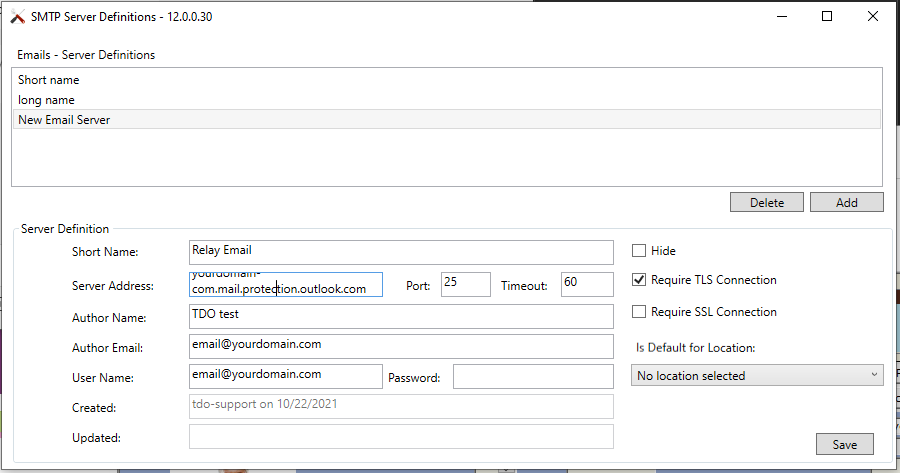
Microsoft made changes to SMTP Authentication, specifically disabling OAUTH support, that has been blocking TDOs ability to send email. TDO is working on OAUTH2 support, but we currently do not have an ETA on when that will be available. There are some configurations other offices were able to implement to work around this, but your specific configuration may need additional settings. We recommend you reach out to MS in regards to how to configure this for your environment.
Below are some potential solutions/workarounds, but TDO is not responsible on supporting/configuring these settings for you and you must work with your IT/Email provider:
One office had to make sure "Disable Modern Authentication" was disabled on the account TDO was using to send out mail:
https://learn.microsoft.com/en-us/exchange/clients-and-mobile-in-exchange-online/enable-or-disable-modern-authentication-in-exchange-online
Working with one of our partner IT firms, they were able to identify a process to work around this by implementing a SMTP relay. Following the steps listed under this Microsoft Article (Option 3), they were able to get things working again. Below is a summary of those steps:
| Device or application setting | Value |
|---|---|
| Server/smart host | Your MX endpoint, for example, yourdomain-com.mail.protection.outlook.com |
| Port | Port 25 |
| TLS/StartTLS | Enabled |
| Email address | Any email address in one of your Microsoft 365 or Office 365 verified domains. This email address does not need a mailbox. |
This is just a summary of the full steps shown in https://docs.microsoft.com/en-us/exchange/mail-flow-best-practices/how-to-set-up-a-multifunction-device-or-application-to-send-email-using-microsoft-365-or-office-365#option-3-configure-a-connector-to-send-mail-using-microsoft-365-or-office-365-smtp-relay. For a full steps of how to setup your email, please consult that link or call Microsoft support.
Article ID: 882
Created: October 22, 2021
Last Updated: February 13, 2024
Author: TDO KB [web_admin@tdo4endo.com]
Online URL: https://kb.tdo4endo.com/article.php?id=882