- repeat this for every matching option associated with the token that you want to include in your sentence
-
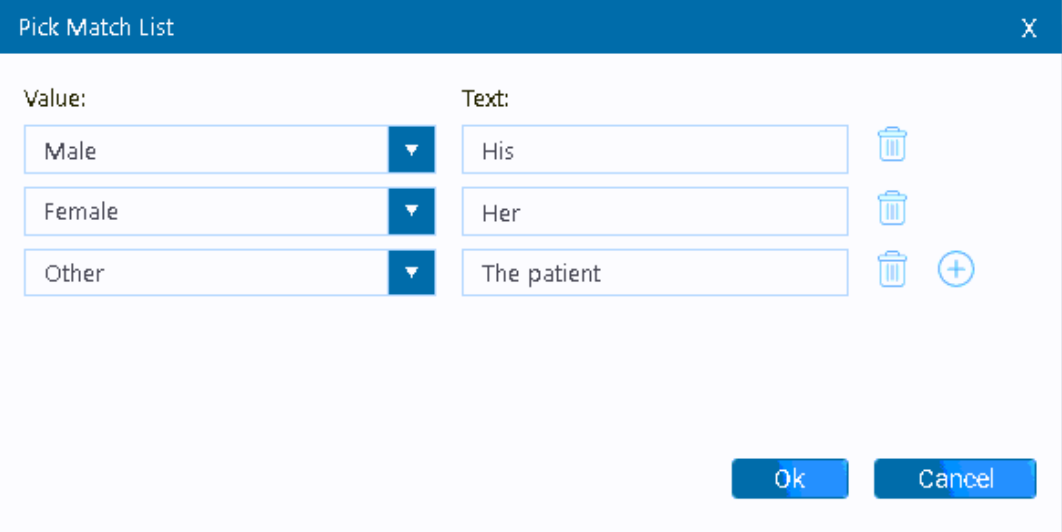
This article goes over how to properly structure token matching because the structuring is different compared to the old letters module (Microsoft Word). The structure changed because of natural limitations when the infrastructure moved from Microsoft Word to Web Based.
The screenshot below displays an example of the matching tokens for the Patient Sex token. The token generator can automatically create the structure in the section below.
Expected sentence output:
"He agreed to the treatment plan prior to the surgery."
Template Token Structure:
<<Sex>><<Match:Male>>He<<
As you can see in green and pink, a token structure was generated for each gender option then placed together in the sentence.
If the example were to include the gender option labeled as "Other" :
<<Sex>><<Match:Male>>He<<
Article ID: 934
Created: October 9, 2023
Last Updated: May 8, 2024
Author: TDOKB3 [IT@tdo4endo.com]
Online URL: https://kb.tdo4endo.com/article.php?id=934