Notes Page - Items to Get and Send
Estimated Reading Time: 1 MinutesOverview
Notes page - Needed section
Detailed Instructions
If additional X-rays/reports are needed from another doctor, or if you need to send any X-rays to any other doctor. When the doctor checks these items from within the patient’s record on the Note page or by clicking the Items Needed button on the Notes to Front page, it generates a report for the front desk.
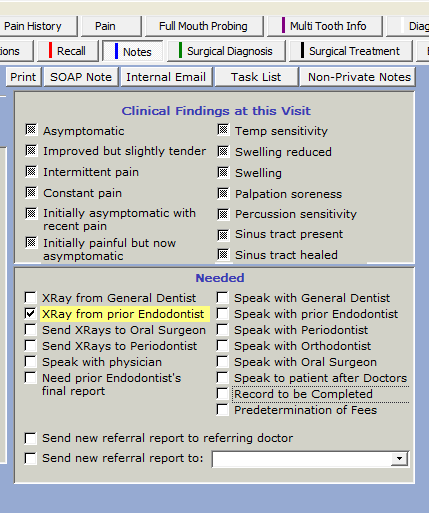
- This list needs to be checked daily, or throughout the day, and as many items requested and sent as possible.
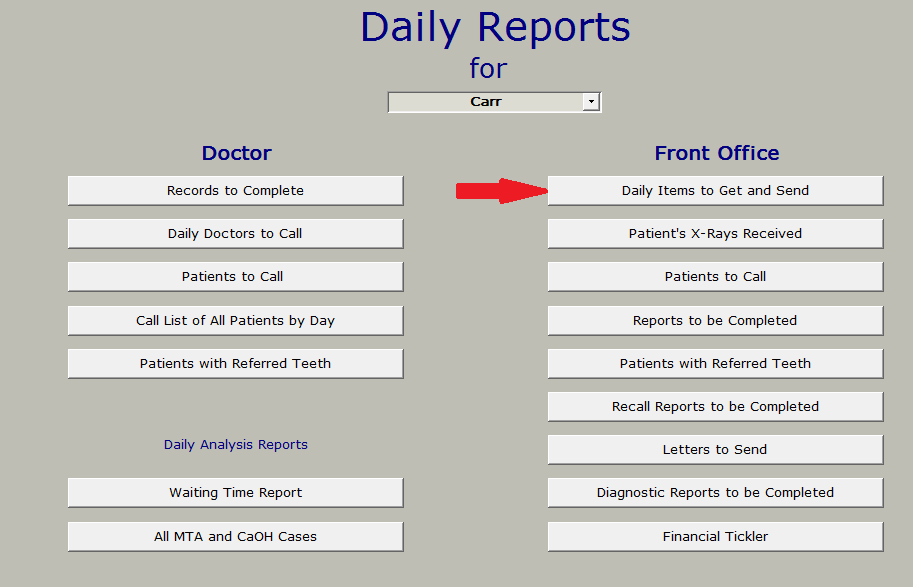
- To open this report, select Reports from the top menu bar and then click Daily Reports
- From the Daily Reports menu, choose Daily Items to Get and Send. If the button is enabled, that means there are items on the list to be done.
This report shows what you need to get or send. The date this request was made is shown, the referring doctor’s name and phone number.
There is a field for Progress Notes. For example, if you called to request an X-ray and are waiting for it to be received. In this case, you would leave the item checked but enter a ‘Progress Note’.
- If you need to open the patient’s record for any reason, you may click the ‘Open Record’ button.
- If you would like to view the notes on this patient, click the ‘View Notes’ button.
- To scroll through all the patients who need something sent or obtained, use the ‘Next’ and ‘Previous’ arrow buttons.
- When you are completed with this report, click the ‘Close’ button.