Fee Listing/ADA Codes
Estimated Reading Time: 2 MinutesOverview
This article goes over how to access and edit your fees list. When you first install The Digital Office, the standard ADA codes are entered automatically. However, you must enter the fees you would like to be used for each of the codes. You may add additional codes or change existing codes as well.
Detailed Instructions
To change/edit this list, click Program Setup on the top menu bar and select Fee Listing / ADA Codes. This list may also be accessed from the patient’s fee page.
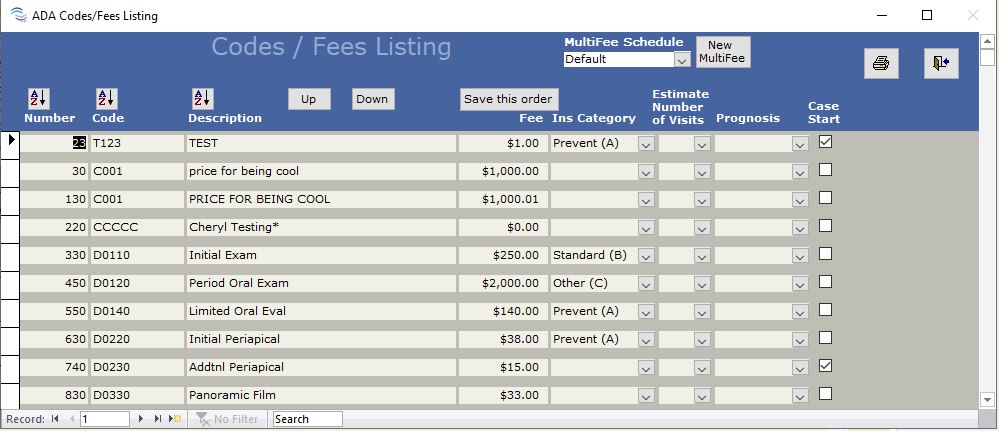
The first column listed is Number. Enter the order number you would like to codes to show up in the drop-down boxes in the program.
If you will be using the insurance estimating portion of the program, you need to fill in the proper value in the Ins Category column, A, B, or C.
There are columns for Estimated Number of Visits and Prognosis. These values entered here will show as the estimated number of visits and prognosis on the fee page, as well as on the pretreatment estimate. These values can be changed once entered on the fee page.
It is important to check the Case Start check box for each fee that you post when you start a case. By posting a Case Start fee, TDO understands that you are starting that procedure and will show properly as a case started on your reports, such as the Snapshot report.
The AZ buttons on the top of each column provide a way for sorting and make it easier to find a particular fee you are looking for. If you make changes to the order and wish to save the order to be used as the order on the fee page, click the ‘Save this order’ button at the top of the form.
When you are completed with this form, click Close.