TDO on Virtualized Environment
Estimated Reading Time: 4 MinutesTDO on Virtualized Environment
Overview
Computing technology is evolving toward virtualization. Virtualization is a proven technology that can enable enterprises to improve IT infrastructure by reducing investments, saving on maintenance costs, and improving scalability. This document will review the TDO application in a virtualized environment and list the advantages and disadvantages.
Requirements
This document will review using TDO in a virtualized environment. The virtualization can be done with VMware or Windows Hypervisors.
This document does not cover TDO in Windows Terminal Services or any other technology that uses the same infrastructure as Windows Terminal Services. TDO is not supported running on Terminal Services Environment.
Current TDO computing infrastructure
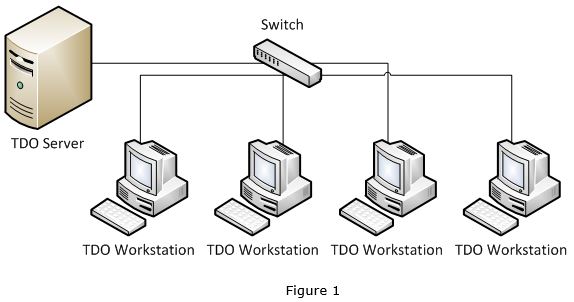
TDO is a Client/Server application that requires the necessary components for any Client/Server application: The Server and the Workstation.
On the server side TDO requires Microsoft SQL Server. On the client side, TDO requires and comes with MS Access Runtime and .Net components.
On the network infrastructure, TDO requires a server computer and workstation computers. On the server computer Microsoft SQL Server will be responsible for managing the database while the Windows File System shared folder will be responsible for storing all the necessary files TDO creates/accesses; including images, documents, digital xray files, etc. The workstations will be connected to the SQL server to access the database and it will have a mapped drive to the shared folder in order to access the necessary documents on the server file system. Figure 1 illustrates a basic TDO required network infrastructure.
TDO on Virtualized Environment
TDO was tested in a virtualized environment and it executed the core functions without problems. The infrastructure must follow the requirements for the Client/Server architecture and the virtualized environment must contain the Server Virtual Machine and the workstations must be isolated virtual machines. TDO running on virtualized environment is illustrated in Figure 2.
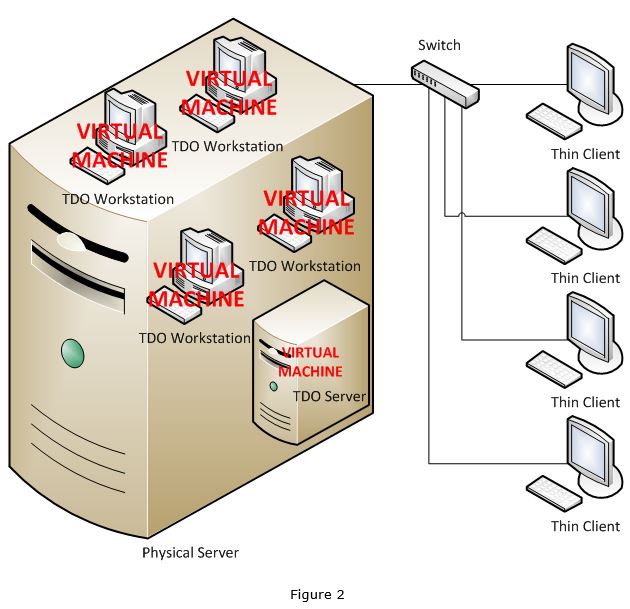
The physical server is a powerful server with enough RAM Memory and Storage space to run multiple virtual machines. The physical server will have Hypervisor OS installed that will be able to provide the necessary peripherals to the virtual machines.
Each virtual machine will be configured as a regular computer. It will have its own memory, hard disk, and any necessary peripherals provided by the Hypervisor. The TDO server would be another virtual machine with Windows Server OS and the configuration would be the same as configuring a regular server but as a virtual machine running inside a physical server.
The thin clients could be either software or hardware. The software thin clients would run on a regular PC while the hardware thin clients would be a physical box that would replace the desktop computers. Both software and hardware thin clients would be connected to each virtual machine.
Pros, Cons and Concerns
The TDO on virtualized environment was tested with the following:
-
Physical Server: Dell 32GB RAM, 4TB disk
-
Hypervisor: VMware ESXi 4 (http://www.vmware.com/)
-
Thin clients: Panologic (now defunct)
There could be variances on these manufactures but the concept is exactly the same for most of them.
These are a few variances:
-
Physical Server: HP, IBM
-
Hypervisor: Windows 2008 Hypervisor, Citrix
-
Thin Client: Wise, Software Thin Client
Pros:
-
Depending on the number of workstations, there could be some savings on total cost of ownership over the years, as desktop upgrades and maintenance would no longer be needed.
-
If running on hardware thin clients, there could also be some electricity cost saving as the thin clients run on less power than workstations.
-
If configured properly by the specialized IT person, it can be easily maintained as all the IT management is centralized.
-
Once configured, if configured properly, the IT can easily revert virtual machines to working state in case of any issues.
Cons:
-
Depending on the number of workstations it can have a higher initial investment on equipment and licenses.
-
Single point of failure. If no disaster recovery plan is in place, any issues with the physical server will cause the entire office to be offline
-
Some high speed USB devices can have some latency issues on large data transfer, specially digital x-ray devices
-
CBCT rendering or any other 3D real time rendering can be affected by the network latency or server CPU shared processing.
Concerns:
-
This infrastructure requires technical knowledge on virtualization. This should not be configured by unprepared IT or by any other person/company that does not have the proper certification or experience on virtualization.
-
Common IT issues that are regularly resolved by the TDO Support representatives will no longer be easily resolved. As this infrastructure requires specific technical knowledge, the TDO Support team will not be able to resolve IT issues in a virtualized environment.
-
Single point of failure. This is a very important concern that any office running on virtualized environment should be aware of. If the server experiences any issues, all the computers in the office would not function. The person/company responsible for setting up the virtualized environment must have a disaster recovery plan that is aligned with the doctor’s acceptance level of downtime.
-
The virtualized infrastructure should not be used for Terminal Services deployment of TDO. TDO requires isolated workstations. There can be a single server, but each workstation must be an isolated VM as well as the TDO server.