VPN Error TUN Interface failed cannot accquire TAP handle
Estimated Reading Time: 1 MinutesIf you are getting the below error when trying to connect OPENVPN. Disable Driver Signature Enforcement.
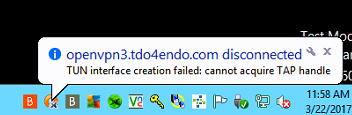
How to disable signature enforcement (server 2012 R2)
1.Activate the windows side panel charm by hovering the mouse at the top right of the screen
2.Clicking the settings wheel
3.Clicking the power option
4.Select Restart as you hold down the shift key (This should take you to the troubleshooting option screen), and then select the reason for shutdown.
5.We can now click on the Troubleshoot option.
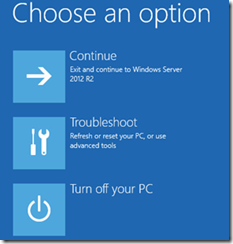
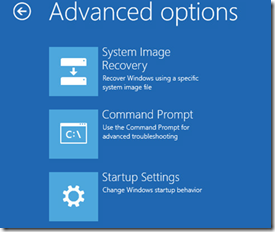
6.We can now select “Startup Settings”
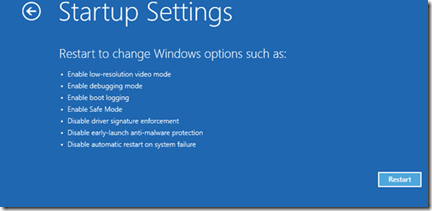
7. From here we can check will be changed and click “Restart”
8. Once the server reboots press f8 to enter the Advanced boot Option Menu
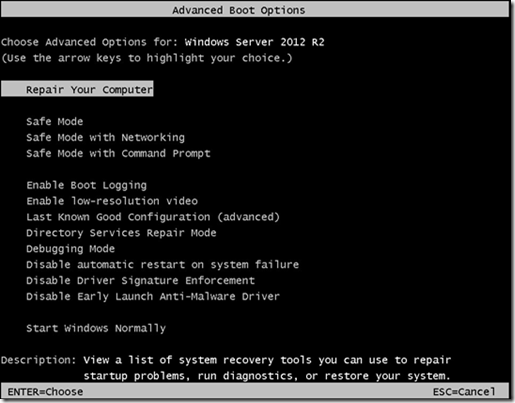
9.At this menu the next thing we will select is the “Disable Driver Signature Enforcement”
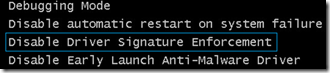
10. Press enter when the selection is made, the server will boot normally now.
11. Install the driver you were having issues with previously due to the restriction.
12. Make sure you select “Install this driver software anyway” during the installation to bypass the restriction you previously encountered.
13. Follow the rest of the prompts and complete the installation.